

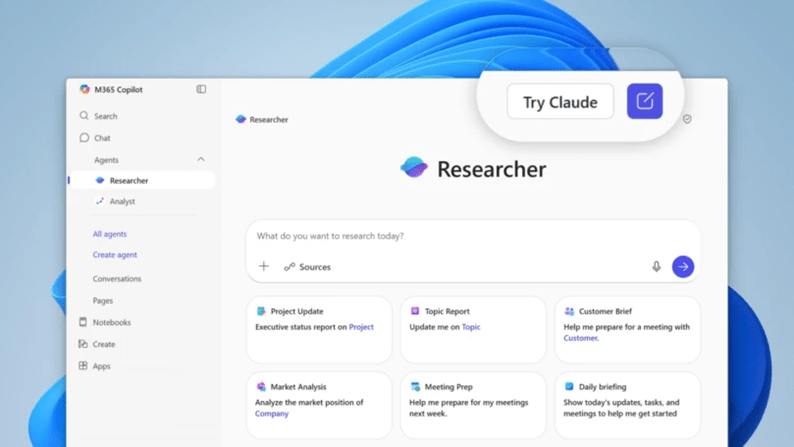
Microsoft is opening up model choice in Microsoft 365 Copilot. Alongside OpenAI models, you can now bring Anthropic’s Claude models into specific experiences like the new Researcher agent and when you build agents in Copilot Studio. For Modern Work leaders, this shifts the conversation from which single LLM to use, to which model fits each job, under the right guardrails.
I like this change because it treats AI as an operating capability, not a magic feature. With model choice, we can design for outcomes, align risk to data classes, and get smarter about cost and performance over time.
The quick take
- You can choose the model per task, starting with Researcher and Copilot Studio.
- You can mix models inside one solution, routing different tasks to the model that performs best.
- Governance needs a clear decision when enabling Anthropic in Microsoft 365, because some Microsoft commitments do not apply to third party processing.
- This is a portfolio decision, not a one time bet on a single model.
Why Modern Work leaders should care
- Task fit beats brand preference
Different models shine at different jobs. Long form reasoning, structured extraction, brainstorming, and policy aware drafting do not always need the same engine. With choice, you can assign the right model to the right work, measure outcomes, and avoid the model monoculture trap. - Cleaner governance conversations
Risk teams can finally review model use per scenario, not as an all or nothing decision. You can approve Anthropic for specific tasks and data classes, document the terms, and keep everything else on Microsoft’s default path. That keeps innovation moving, without creating shadow AI. - Better economics without cutting quality
Once you benchmark quality, latency, and token spend, you can reserve premium reasoning models for high impact tasks, and use more efficient options for routine flows. That is how AI moves from interesting to economical.
What to do in the short term
Here is a pragmatic plan you can run without a giant program. It keeps scope tight and focuses on results your business sponsors will understand.
1. Pick three real tasks
Choose one knowledge task, one writing task, and one data task. Examples, a policy summary for Legal, an executive brief for a sales pursuit, and a requirements extraction from meeting notes.
2. Define simple guardrails
For each task, agree the data class, any residency needs, and whether Anthropic is allowed. Note that when you use Anthropic inside Microsoft 365, some Microsoft product terms and commitments do not apply. Record that decision in your risk register and move on.
3. Run a bake off
Use the same inputs and scoring rubric. Measure accuracy, reviewer confidence, latency, and token usage. Ask the reviewers a simple question, would you ship this as is, yes or no. Capture the why.
4. Set routing rules
For each task, choose a primary model and a fallback. Define a switch rule, for example if accuracy drops below a threshold, try the fallback. Keep the rules short and testable.
5. Ship one small agent
Use Copilot Studio to encode the routing. Keep prompts in source control, store the benchmark set, and schedule a quarterly re test. Share the results with your risk committee and your business sponsors.
Talk about this with stakeholders
- For CIOs and CTOs, this is about choice, control, and runway. We keep Copilot as the experience our users love, we expand the engines under the hood, and we keep tight control over when and how a third party model is used.
- For CISOs and DPOs, this is about transparent data flows. We document when tasks call Anthropic, we reference the applicable terms, and we narrow usage to approved data classes.
- For Finance, this is about unit economics. We track cost per successful task, not just tokens. We show where premium models drive revenue or risk reduction, and where efficient models keep costs low.
Common questions I hear
Do we need a big RFP now
No. Start with a limited set of tasks and a short benchmark. Prove value, then scale.
Will users notice a difference
Not if you design the experience well. Keep Copilot as the front door, route behind the scenes, and focus on quality and latency.
Is this safe for regulated data
Treat it like any other third party processing decision. Classify the data, apply policy, record the terms, and limit usage where needed. If the data is sensitive and policy does not allow it, keep that task on Microsoft’s default model path.
A simple maturity ladder
- Level 1: Default only, everything runs on Microsoft’s default model.
- Level 2: Controlled trials, selected tasks approved to use Anthropic with documented terms.
- Level 3: Policy aware routing, Copilot Studio agents route per task, with audit and quarterly re tests.
- Level 4: Outcome engineering, teams manage a small model portfolio, publish benchmarks, and continuously improve prompts, tools, and routing rules.
Final thought
Model choice in Microsoft 365 Copilot is not about picking a winner, it is about building a repeatable way to match tasks to models, with clear controls and measurable outcomes. Start small, measure honestly, and let the results guide you. Your users will not care which model you chose, they will care that the execution is fit for purpose, fast, and safe.
 Modern Work James