

There is a moment in every company where someone says, half joking, “We should build an app for this”, then everyone looks around the room, remembers the backlog in IT, and quietly returns to Excel.
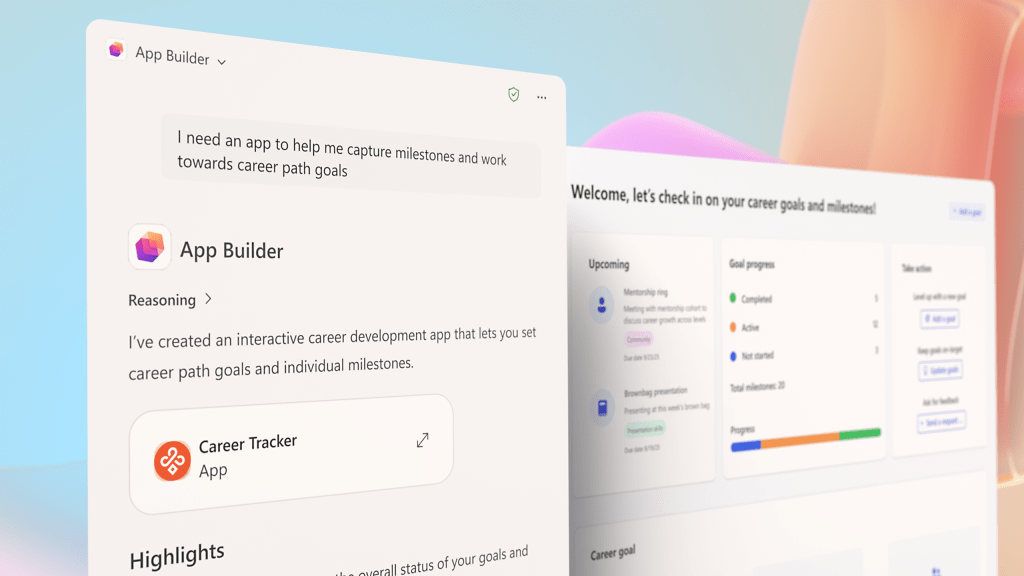
With the latest Microsoft 365 Copilot update, that moment changes. You can still joke about building an app, but now you can actually do it, in the same place you write emails and Teams messages, without begging for a new environment, a database, or a six week intake process.
This release is firmly pointed at work, not personal tinkering. Microsoft is rolling out three big pieces for Microsoft 365 Copilot customers in the Frontier program:
- App Builder, to turn prompts into lightweight apps and dashboards
- Workflows, an agent that automates everyday processes using Outlook, Teams, SharePoint, Planner and Approvals
- A lightweight Copilot Studio experience inside Copilot, so employees can create focused agents grounded in real work, then graduate them into full enterprise solutions when IT is ready
All of this runs on your existing Microsoft 365 stack, your permissions model, and your compliance story. That is the bit that should make admins sit up.
From “Can someone build this” to “Copilot, build this”
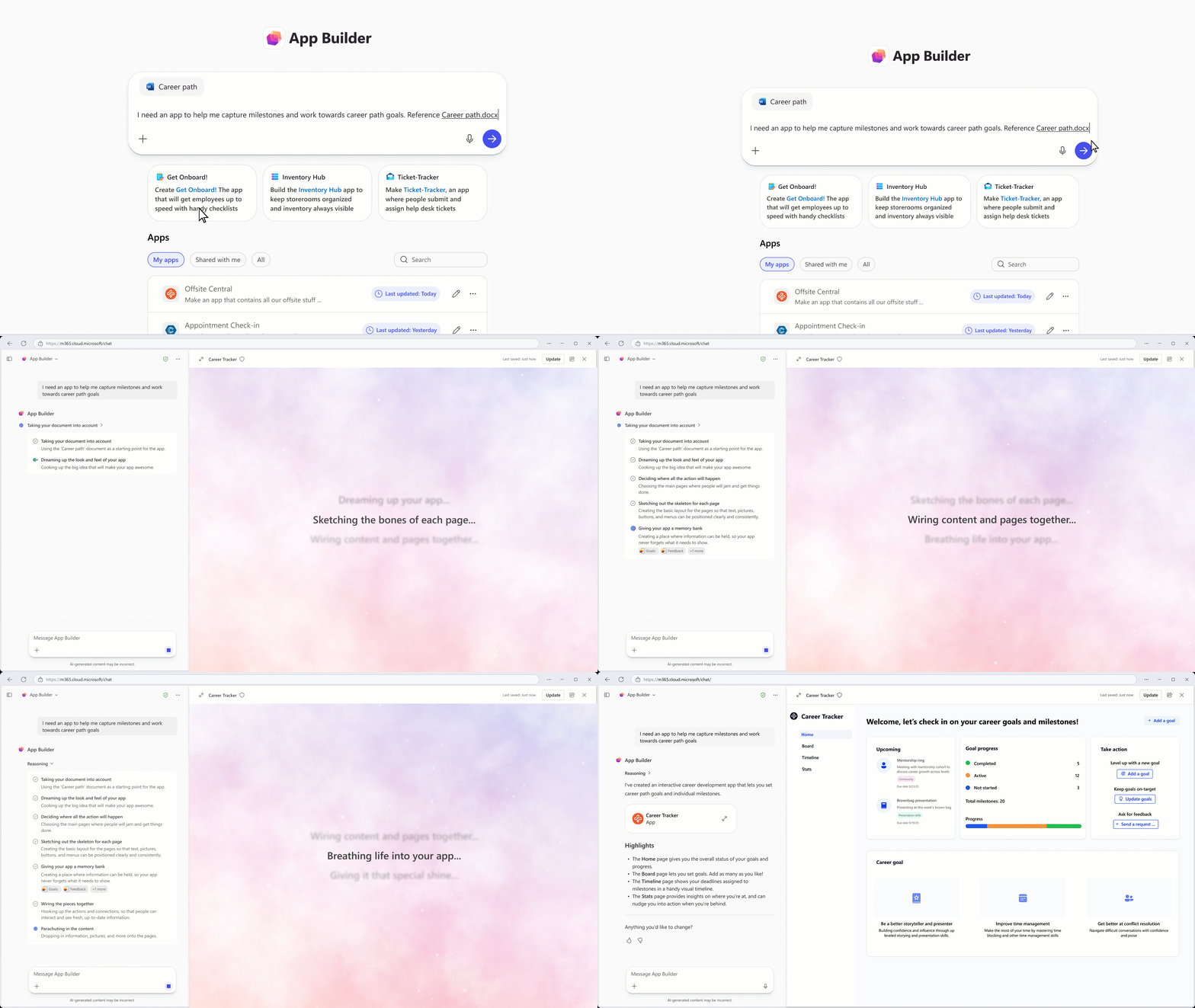
App Builder is the quiet star if your organisation lives on hero spreadsheets and the occasional half finished Power App.
Inside Copilot, you ask for an app that behaves like a proper front end, then refine it through conversation. Need a dashboard, a few charts, or a simple list with status and owners, you describe it and iterate, all without leaving Copilot.
Under the hood, App Builder:
- Uses your existing Microsoft 365 content, documents, decks, spreadsheets and notes
- Stores data in Microsoft Lists, so it is structured and reportable
- Shares like any other file, with links that respect existing permissions
So you keep data in your tenant, avoid another mystery database, and let the people who own the process shape the app. IT can then standardise patterns and controls, instead of hand crafting every single solution.
Workflows for the people who hate workflows
Power Automate is powerful, but most business users do not want to live in a separate flow designer.
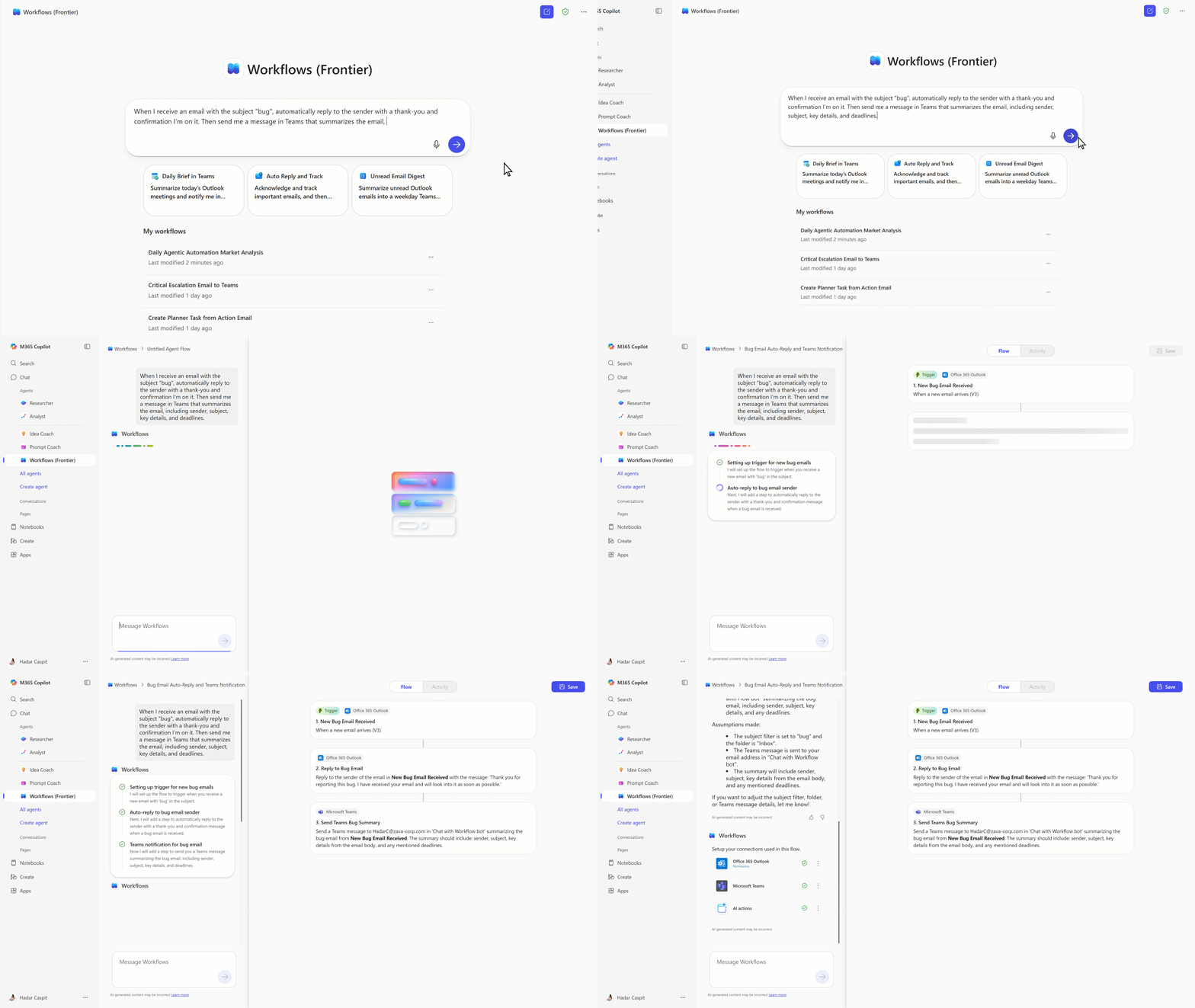
The Workflows agent hides that complexity behind a chat. You say something like:
“Every Monday morning, send our project leads a summary of deadlines from Planner, then post upcoming approvals into this Teams channel.”
Copilot turns that into an automated flow across Outlook, Teams, SharePoint, Planner and Approvals, and shows the steps as it builds them. If something looks off, you tweak it in the same conversation.
Workflows is aimed at end users but runs on the same plumbing that powers Agent Flows in Copilot Studio. So you get automation that feels approachable at the front, and enterprise grade reliability at the back.
A mini Copilot Studio in every inbox
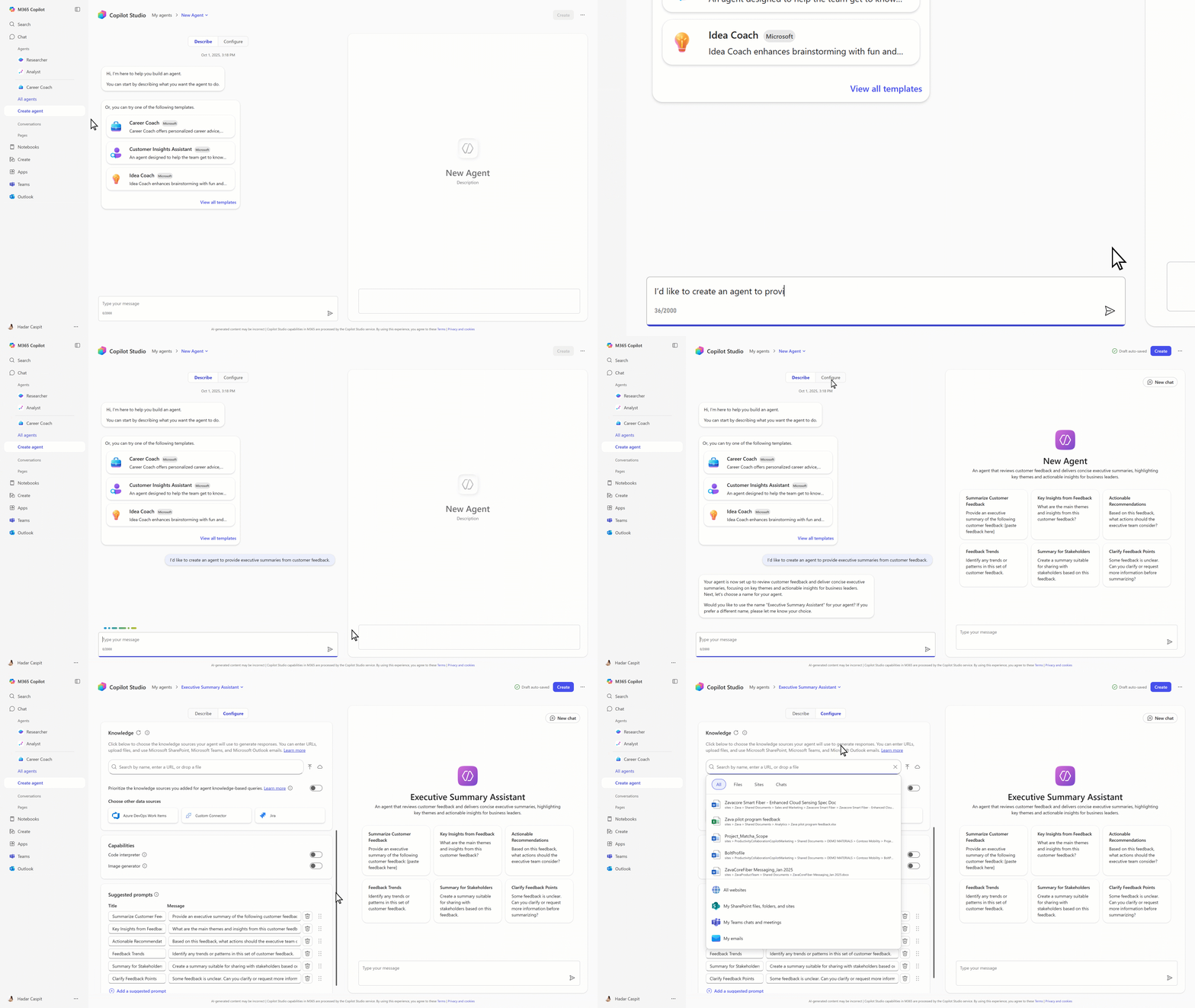
Alongside App Builder and Workflows, there is a lighter Copilot Studio experience directly inside Copilot. You describe the agent you want, Copilot turns that into a structured agent with instructions and logic.
Those agents can draw on:
- SharePoint sites and libraries
- Teams chats and meeting transcripts
- Emails and files across Microsoft 365
- External systems through connectors like ServiceNow or Jira
So instead of one giant Copilot that knows a bit about everything, you can spin up focused agents for HR policy questions, client playbooks, project onboarding, or incident response. When an agent proves it is genuinely useful, IT can lift it into full Copilot Studio, wire in richer workflows, and bring it under proper lifecycle management.
Governance and control, or why IT will not hate this
App Builder, Workflows and the embedded Copilot Studio experience sit on the same security, compliance and reliability foundation as Microsoft 365 Copilot, with Microsoft 365 data and permissions at the core.
For admins, that means:
- Central visibility into agents and workflows
- Role based access for building tools
- A cleaner story for audit, data residency and access control
You still need guardrails, which processes can be prompt built, when human approvals are mandatory, and where certain systems are always off limits. The difference is that you build on governance you already have, rather than inventing a parallel control model.
Availability and how to experiment
App Builder and Workflows are available as agents in the Agent Store for Microsoft 365 Copilot customers in the Frontier program (GA to come later). You can also create personalised agents through the “Create agent” entry point in Copilot.
If you are in that program, this is the moment to move beyond “summarise this document” and run a small but serious experiment
Pick one noisy process. Launch tracking, approvals, onboarding, status reporting.
Let the business write the first prompt. The people who live the pain describe the app or workflow, IT refines and applies policy.
Set a few clear rules. What data is off limits, where human approvals must stay, when an agent needs review before wider use.
Measure outcome, not theatre. Watch email volume, cycle time, error rates and meeting load. Adjust if nothing actually changes.
My take
Low code has been promising for years that business users can build what they need while IT keeps everything safe. In reality, most organisations have a few heroes, a graveyard of half finished apps, and a backlog that never really shrinks.
By letting people describe the outcome and turning that into apps, workflows and agents inside the tools they already use, Copilot is trying to shave a lot of friction out of that story. Because it sits on familiar building blocks like Microsoft Lists, SharePoint, Teams and Copilot Studio, IT does not have to pretend this is a separate universe.
No, this will not turn every employee into an app designer. You still need patterns, governance, reviews and someone who keeps the ecosystem tidy. But if it shrinks the gap between “we should fix this process” and “we actually did something about it” from months to hours, that is a very real enterprise win.
The better question now is not “can Copilot build for us”, it is “what are the first five things we are brave enough to let it build”.
 Modern Work James
I found this very interesting to read! Thank you.
Regards
Phil Wiles
LikeLike